
As you may know, Family Law Software is phasing out the desktop software on September 30, 2026.
This week will answer questions that Desktop Edition users may have about their next steps.
Confirming Your Edition
If you are not sure what edition you have, you can find out by clicking here, filling in the account information, and clicking Submit Request. (No charge at that moment.)
You can find the person whose name is on the account, and their User Id, by looking at the top of the Open / Save screen in the desktop software, as shown below.
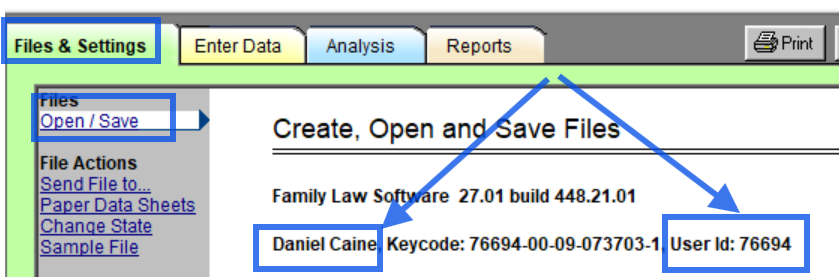
You also see the User Id at the end of that line. You will want to know the User Id when you are upgrading the software.
Upgrading to Cloud
You will have to upgrade to one of the Cloud editions before September 30, 2026.
There are two cloud editions to consider, Cloud Individual and Cloud Firm.
If there are two or more people in the firm who would like to access the software, you may wish to consider upgrading to the Cloud Firm edition.
The Cloud Firm edition has the following benefits:
- Add all additional non-professional Staff, each with their own logins, at no additional cost.
- Enable Professionals and Staff to view and edit each other’s files.
- Enable opening of files of Professionals who have left the firm.
The Cloud Individual Edition costs the same as the desktop software you currently have. (If you pay annually, the software will reset your subscription to end a year from now and charge you the pro rated amount from the old renewal date to the new one.)
The Cloud Firm edition costs $10 more per Professional per month than the Desktop software you currently have.
To upgrade to either Cloud Individual or Cloud Firm, do the following:
- Click here.
- Enter the name, state, and User Id as shown above.
- Click Submit Request.
- Select either Cloud Individual or Cloud Firm and continue.
As an alternative, you can have multiple Cloud Individual subscribers on the same account, but they will not be able to see each of these files and you will not be able to add Staff.
If there is only one person in the firm, then Cloud Individual Edition is the way to go. If more than one person wants to work in the software, however, then we really recommend Cloud Firm.
Add Additional Members
If you upgrade to Cloud Firm, you can add additional members through the Account Manager as follows:
- Log in to Family Law Software.
- In the upper right hand corner, click the Account button.
- Click the tile to Add/Remove Employees.
- Click the “+” at the top to add employees
Additional Professionals will add $10 per month per Professional to your charge, after a one-time $99 set-up fee. Additional non-professional Staff, such as paralegals, are free.
Add a System Administrator
When you add an employee, specify that they are a system administrator.
The person will then be able to log in themselves and add and remove employees.
If they do not get a registration email, they should do the following:
- Go to pro.flsgo.com.
- Click “Forgot your password?”
- Register.
- Go to pro.flsgo.com again.
They will be taken to the Account Manager.
Transitioning to Cloud
Click here for general questions about phasing out of the desktop software.